
Workforce Planning: Plan your people. Drive your numbers.
Headcount as the input.
Budget as the output.
The new module inside Yarken Planning and Forecasting.
There's a question that comes up early in every IT budget cycle. How many of these line items are people?
Almost all of them. Salaries, contractors, benefits, allocations, the loaded cost of every team. In most IT cost bases, people sit somewhere between sixty and eighty percent of total spend.
Now ask the second question. Where is the headcount plan? Usually in a spreadsheet. Owned by someone in HR or by a team lead. Updated when the offer letters land. Reconciled into the budget by hand, monthly, by whoever drew the short straw.
By Q2, the gap between the headcount plan and the budget is wide enough that the variance reports start measuring drift instead of decisions.
The problem isn't workforce planning. There is no shortage of workforce planning tools. The problem is that workforce planning sits outside the budget. So the budget never reflects the people, and the people are never tested against the budget until someone reconciles by hand.
Most attempts to fix this look the same. Tighter spreadsheet templates. A monthly meeting to align HR and finance. A new ETL job that imports headcount changes once a week. It gets managed. It never gets solved.
Headcount is not a separate plan,
it's the input to the budget.
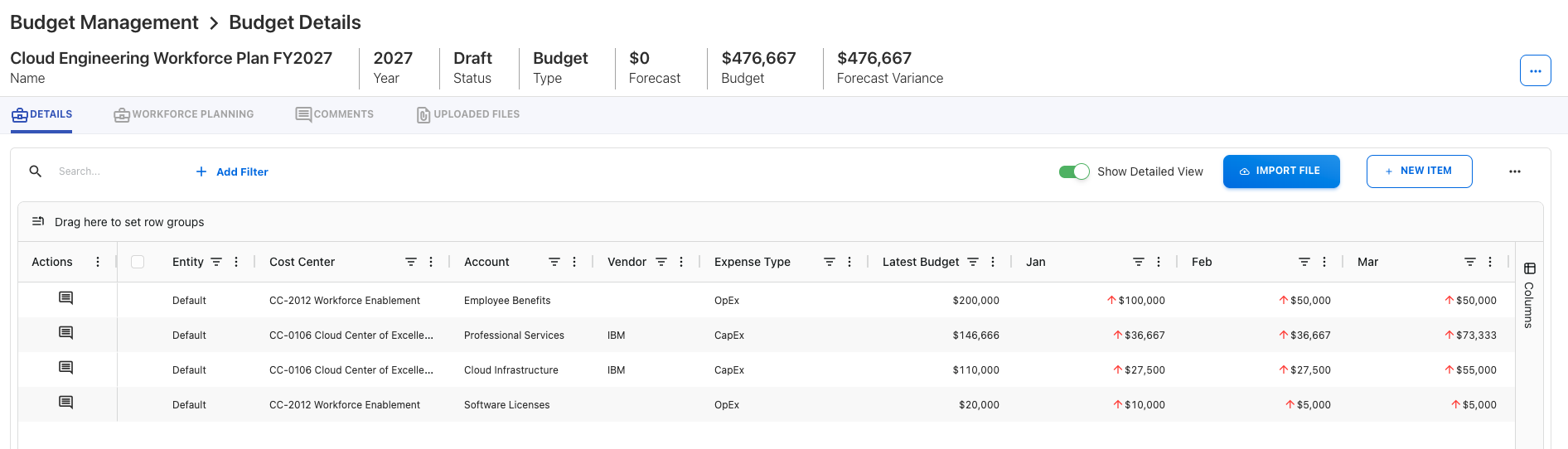
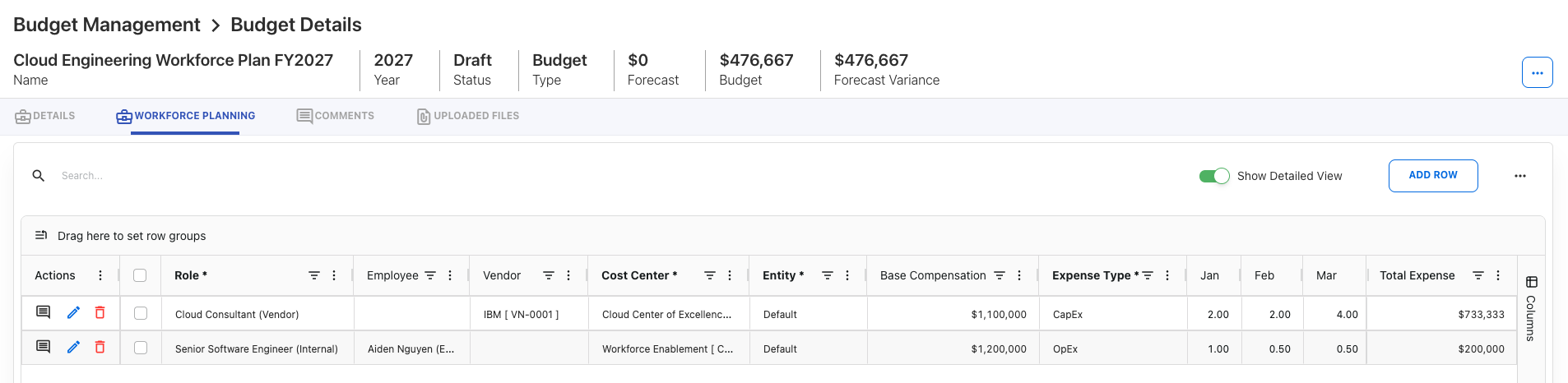
Workforce Planning lives inside Yarken's existing Budget and Forecast workflow. It is not a parallel surface. The Budget Process Owner sees it as another way to populate budget lines. Cost Center contributors see it as another set of inputs to review.
The structural move is simple. Roles are configured once, in Admin, with a fully-loaded annual rate and the account mappings that split that rate across the typical labor accounts. The Budget Process Owner creates a plan, adds the role, and assigns it across one or more cost centers or projects with the distribution the plan calls for. Cost Center Owners review and adjust headcount and assumptions month by month to update the Forecast. The platform takes the monthly cost, splits the dollar amount across the assigned cost centers or projects, then splits each amount across the labor accounts according to the role's mapping, and posts the resulting budget entries. Budget entries that come from a workforce plan are non-editable in the budget itself, because the workforce plan is the source of truth.
The same approval cycle that already governs the budget governs the workforce plan. Same Budget Process Owner. Same contributors. Same Draft, In Progress, Approved lifecycle. Same publish step. No second tool to learn.
What this looks like in practice
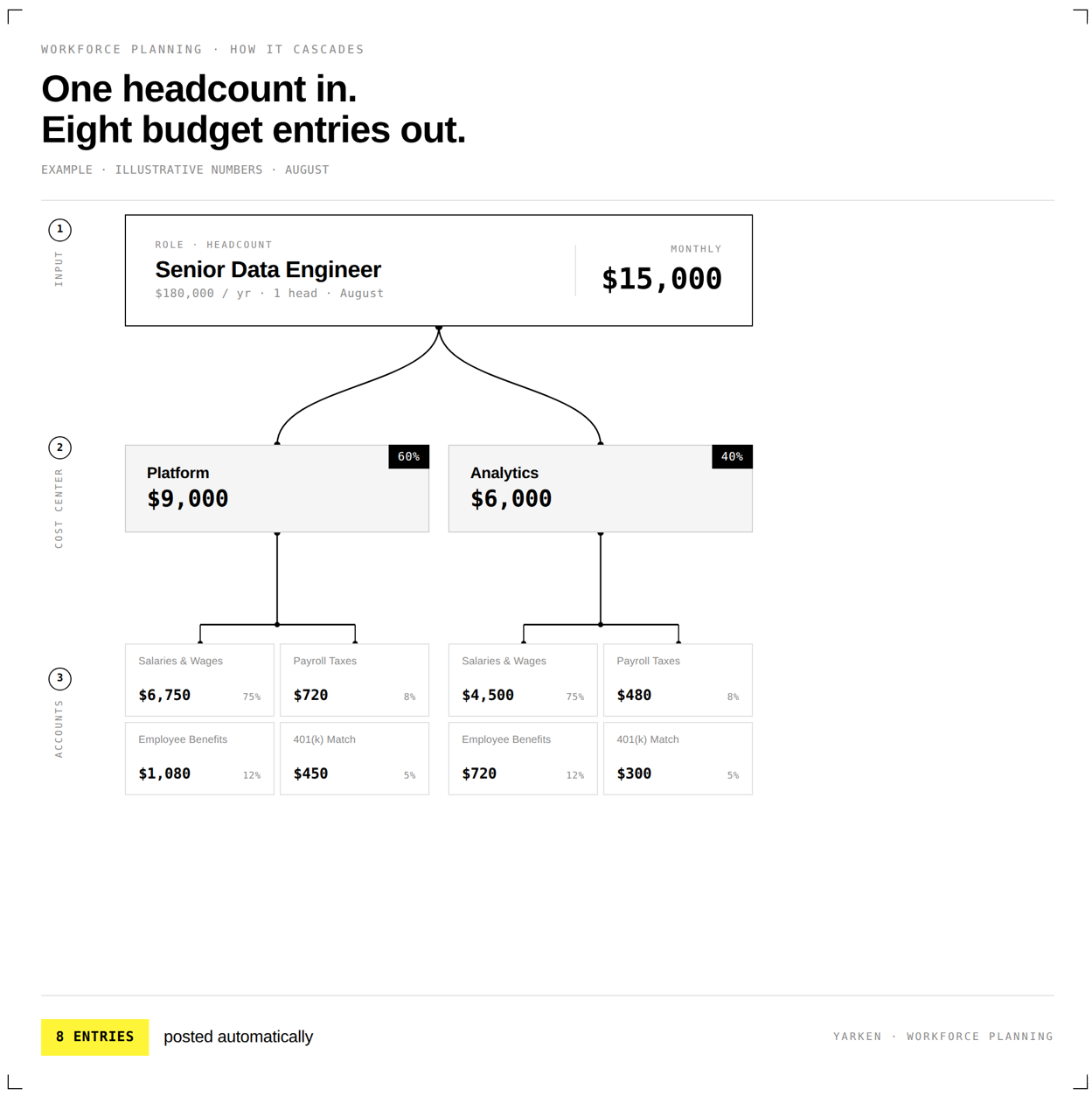
Take an illustrative example. A senior data engineer is configured with a fully-loaded annual rate of $180k. Admin maps that rate across the typical labor accounts: Salaries and Wages at 75% ($135k), Payroll Taxes at 8% ($14.4k for FICA, Medicare, and federal and state unemployment), Employee Benefits at 12% ($21.6k for health, dental, vision), and 401(k) Match at 5% ($9k).
The Budget Process Owner adds the role to a plan and assigns it across two cost centers: 60% Platform, 40% Analytics. The same setup could be two or multiple projects, or a mix of cost centers and value streams. The Cost Center Owner reviews the plan and adjusts the distribution or assumptions before submitting. Employees and contractors are planned the same way.
The platform calculates $15k for the month, splits it 60/40 across the two cost centers ($9k to Platform, $6k to Analytics), then splits each cost center amount across the four labor accounts according to the role's mapping. Eight budget entries are posted automatically: two cost centers times four accounts. If the role's start date slips a month, the whole calculation re-runs. If the contributor flags an additional contractor for September, the entry is added directly.
The contributor reviews and submits back. The Budget Process Owner approves. Once published, the data flows into reporting and dashboards on the same surfaces that already display the budget.
- Headcount plan in HR's or a team lead's spreadsheet.
- Cost calculation in finance's spreadsheet.
- Budget in the platform.
- Reconciliation by hand, monthly.
- Audit trail spread across three systems.
- Headcount plan in Yarken, structured.
- Cost auto-calculated from configured role rates, split across cost centers (or projects) and across labor accounts.
- Budget populated automatically, non-editable from the workforce plan side.
- Approval flow inherited from the existing Budget process.
- One audit trail, one lifecycle.
That is what we mean by Workforce Planning in Yarken. Not a separate planning surface bolted on for HR. The headcount and the budget, in the same record, with the same approval flow, telling the same story.
Plan your people. The numbers come with them.