Control, Flexibility, and Personalization: New Feature Release
We’re excited to announce several new features that give you even more control and personalization within our platform. From managing global spend to branding your workspace, here’s what’s new.
Configuration of Currency Exchange Rates
Managing cloud spend across multiple currencies is now easier than ever! You can now configure exchange rates for currency conversions directly within the application settings.
This enhancement allows you to:
- • Define exchange rates from any source currency to your system-defined currency.
- • Automatically convert cloud billing data using your specified rates.
- • Standardize financial reporting across different regions.
The platform seamlessly applies these rates to ensure consistent financial insights across all dashboards and reports.

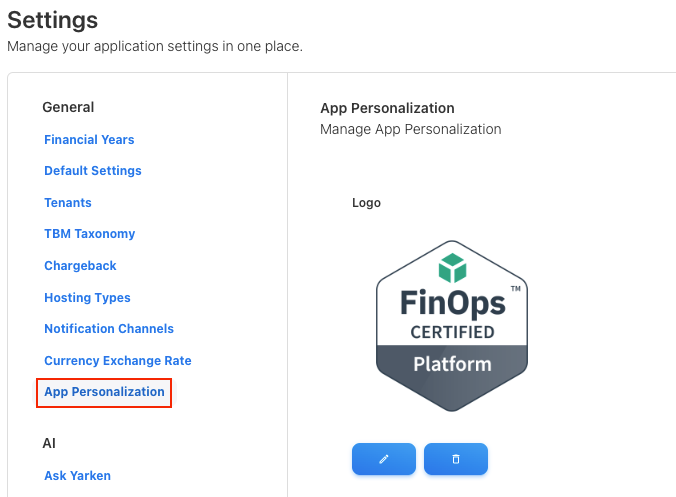
Custom Logo on the Menu Bar
Your platform, your brand. Our new personalization option lets you upload a custom logo to replace the default menu bar branding—maintaining consistency across your internal tools with no technical setup required.
- • Replace defaults with your corporate identity.
- • Automatic resizing for optimal display.
- • Simple upload through platform settings.
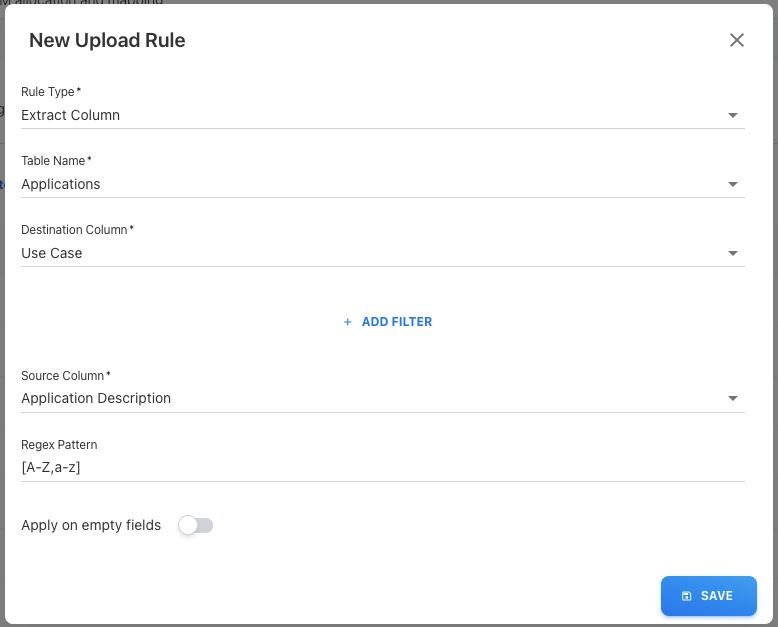
New Upload Rule Type: Extract Column
Fine-tune your data ingestion with even greater precision. The Extract Column rule type helps you isolate specific data from text fields during file uploads using Regex Patterns.
Define custom patterns to locate and extract exactly the data you need, then map those values directly to your destination columns. This dramatically improves the platform's ability to support complex data parsing requirements.